
CI/CD with GitHub Actions, DigitalOcean Container Registry, and Kubernetes Deployment
Businesses increasingly rely on custom software, web applications, and connected systems to manage daily operations. Whether it's a customer portal, internal application, or specialized business platform, keeping software updated and reliable is essential to maintaining productivity and delivering a positive customer experience.
However, deploying software updates can introduce challenges. Manual processes, inconsistent configurations, and inadequate testing may lead to unexpected errors, downtime, or delays in releasing important improvements.
Continuous Integration and Continuous Delivery (CI/CD) offer a more structured approach to software development and deployment.
By automating repetitive steps in the development process, CI/CD pipelines help businesses release software updates more efficiently while reducing opportunities for human error.
At AIM IT Services, we understand that dependable business applications require more than well-written code. Effective development workflows, reliable infrastructure, and ongoing application support all contribute to long-term software performance.
What Is CI/CD Automation?
CI/CD refers to Continuous Integration and Continuous Delivery, two practices that help development teams build, test, and release software more consistently.
Continuous Integration involves regularly combining code changes into a shared project and using automated processes to identify potential problems.
Continuous Delivery prepares validated software changes for deployment, often with an approval step before they are released.
Continuous Deployment takes automation further by allowing software changes that pass required checks to be released automatically.
Together, these practices help organizations establish repeatable development and deployment processes.
How CI/CD Works
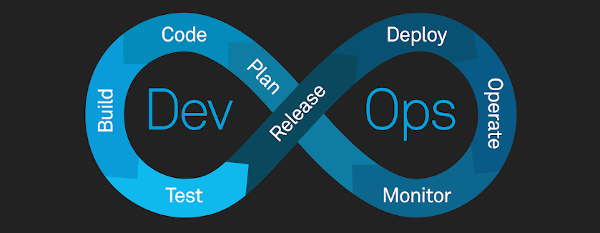
A typical CI/CD workflow includes several stages:
-
Developers make updates to an application or software system.
-
Changes are submitted to a shared code repository.
-
Automated checks test the code for potential errors.
-
Approved software changes are packaged for deployment.
-
Updated application versions are released to the appropriate environment.
-
Monitoring helps identify performance issues or unexpected behavior.
The goal is to make software updates more predictable while reducing the manual effort required to prepare each release.
Why CI/CD Matters for Businesses
CI/CD automation is often discussed as a developer productivity tool, but its benefits extend beyond technical teams.
For businesses that depend on custom applications, a reliable deployment process can directly affect operational efficiency, customer satisfaction, and long-term technology costs.
Faster Software Updates
Traditional development workflows may require several manual steps before an application update can be released.
Automated pipelines streamline repetitive activities such as code validation, testing, and deployment preparation.
This can help organizations deliver improvements more efficiently without relying entirely on manual processes.
Reduced Risk of Deployment Errors
Manual software releases can introduce mistakes, including incorrect configurations, missing files, or inconsistent application versions.
CI/CD workflows help standardize how changes are prepared and deployed.
Automated checks can identify certain problems earlier, although thorough testing and review remain essential.
Improved Business Continuity
Software updates sometimes require maintenance windows or temporary interruptions.
Modern deployment strategies can help reduce disruption by introducing new application versions gradually and monitoring their performance.
While no deployment process can guarantee uninterrupted service, thoughtful automation can improve consistency and reduce avoidable downtime.
Better Collaboration and Accountability
CI/CD systems create a more organized process for reviewing, testing, and releasing software changes.
Development teams can maintain clearer records of updates, identify when changes were introduced, and coordinate releases more effectively.
This visibility is especially valuable when multiple developers or teams contribute to the same application.
How GitHub Actions Supports Automated Software Development
GitHub Actions is an automation platform that helps development teams create repeatable workflows for building, testing, and deploying applications.
GitHub is widely used for managing software source code and coordinating development activities.
GitHub Actions extends those capabilities by allowing specified events, such as submitted code changes, to trigger automated processes.
Business Benefits of GitHub Actions
For organizations investing in custom software, GitHub Actions can support:
-
Automated testing before application updates are released
-
Consistent software build processes
-
Reduced manual deployment preparation
-
Improved coordination between development teams
-
More reliable tracking of software changes
-
Repeatable deployment procedures
By incorporating automated checks into the development process, businesses can reduce the likelihood that certain errors reach production environments.
The effectiveness of these workflows depends on how thoroughly they are configured and tested.
What Is DigitalOcean Container Registry?
DigitalOcean Container Registry is a private service for storing and managing container images used to deploy software applications.
Containers package an application with the components it needs to run, helping maintain consistency between supported environments.
For businesses, this can simplify how applications move from development and testing into production.
Why Container Registries Matter
A container registry provides a centralized location for managing application images.
Instead of manually preparing software on each server, development teams can store approved application versions and use them during deployment.
Potential benefits include:
-
More consistent application deployments
-
Easier management of software versions
-
Reduced configuration differences between environments
-
Better organization of application releases
-
Improved coordination between development and infrastructure teams
Container registries are particularly useful for organizations managing multiple applications or frequently releasing software updates.
However, private registries still require appropriate access controls, credential management, and security monitoring.
How Kubernetes Supports Reliable Application Deployment
Kubernetes is a platform used to manage containerized applications across computing environments.
It helps organizations coordinate application deployment, resource allocation, scaling, and certain recovery processes.
Although Kubernetes is a technical platform, its business value comes from supporting more consistent application operations.
Application Scalability
As business demand changes, applications may need additional computing resources.
Kubernetes can help distribute application workloads and support scaling based on configured requirements.
This flexibility can be valuable for customer-facing applications that experience changing usage levels.
More Controlled Software Updates
Kubernetes supports rolling updates, which gradually replace existing application instances with newer versions.
When properly configured, this approach can help maintain application availability during updates.
It also supports rollback capabilities that allow teams to return to a previous application version when necessary.
Improved Application Resilience
Kubernetes can monitor certain application conditions and restart or replace containers when configured health checks identify problems.
These capabilities support application resilience but do not eliminate the need for monitoring, backups, or incident response planning.
Businesses should evaluate whether Kubernetes is appropriate for their application requirements, since smaller workloads may not justify the additional complexity.
How GitHub Actions, DigitalOcean, and Kubernetes Work Together
These technologies can be integrated to create a coordinated software deployment process.
GitHub Actions handles workflow automation, DigitalOcean Container Registry stores application images, and Kubernetes manages the deployment of those images into supported environments.
The process generally works as follows:
-
A developer submits an approved software change.
-
GitHub Actions runs automated build and testing workflows.
-
The application is packaged into a container image.
-
The image is stored in DigitalOcean Container Registry.
-
Kubernetes retrieves the approved image and deploys the updated application.
-
Monitoring and validation confirm whether the updated application is operating as expected.
According to DigitalOcean's documentation, its Kubernetes service supports direct integration with DigitalOcean Container Registry.
This approach allows development teams to establish more consistent software delivery processes while reducing the number of manual steps involved.
When Should a Business Consider CI/CD Automation?
Not every organization needs a complex software deployment environment.
However, businesses may benefit from CI/CD automation when applications are frequently updated, multiple developers contribute to projects, or manual deployments create recurring problems.
Common signs include:
-
Software updates frequently cause unexpected errors.
-
Application releases require substantial manual effort.
-
Development teams struggle to maintain consistent environments.
-
Business operations depend on custom applications.
-
New features take longer than expected to reach users.
-
Deployment-related downtime affects customers or employees.
-
Multiple applications require ongoing maintenance and updates.
For organizations with these challenges, evaluating deployment automation can be a practical step toward improving software reliability.
Important Security Considerations for CI/CD Pipelines
Although automation reduces certain operational risks, CI/CD environments introduce their own security considerations.
Automated workflows may interact with source code, cloud infrastructure, application credentials, and production systems.
Businesses should ensure these environments are appropriately protected.
Access Controls and Permissions
Development and deployment systems should follow the principle of least privilege.
Users and automated processes should receive only the permissions necessary to perform their responsibilities.
Secure Credential Management
Passwords, API tokens, and other sensitive credentials should be stored using appropriate secrets management capabilities rather than embedded directly into application code.
Automated Testing and Review
Security scanning and automated testing can help identify certain vulnerabilities before software is deployed.
However, automated checks should complement human review and established development standards.
Deployment Monitoring and Recovery
Organizations should establish procedures for monitoring application releases and responding when unexpected issues occur.
Rollback capabilities, backups, and documented recovery processes can reduce operational disruption.
How AIM IT Services Supports Custom Software Development
Successful software development requires an understanding of both application functionality and the infrastructure supporting it.
At AIM IT Services, we help businesses develop and maintain software solutions designed around their operational needs.
Our experience in custom software development, cloud infrastructure, and managed IT services allows us to approach application projects with attention to reliability, security, and long-term maintainability.
Custom Business Applications
Businesses with specialized workflows often need software that extends beyond the capabilities of standard commercial applications.
Custom development can help streamline operations, connect systems, and support unique business requirements.
Cloud and Application Infrastructure
Reliable software depends on properly planned hosting environments, application configurations, and infrastructure resources.
AIM IT Services helps organizations evaluate technology requirements and implement practical solutions that support their applications.
Ongoing Software Support and Improvement
Business applications require continued maintenance as requirements change, security threats evolve, and new features become necessary.
Establishing consistent development and deployment practices helps organizations manage these changes more effectively.
Final Thoughts: Better Software Deployment Supports Better Business Operations
CI/CD automation helps businesses improve how software changes are developed, tested, and released.
Tools such as GitHub Actions, DigitalOcean Container Registry, and Kubernetes provide capabilities that can support more efficient development workflows and consistent application deployments.
However, the value of these technologies depends on selecting the right tools, configuring them appropriately, and aligning deployment processes with business requirements.
For organizations relying on custom software, an effective development and deployment strategy can reduce operational friction, improve application reliability, and support future growth.
At AIM IT Services, we understand that software should make business operations easier, not more complicated.
Contact AIM IT Services to discuss your custom software development needs and explore solutions that support reliable, efficient business applications.